· 10 min read
I built a tool to check AI’s work. The most useful thing it says is “I’m not sure.”
What I learned from building TwoPass, measuring it, and measuring it again
Contents
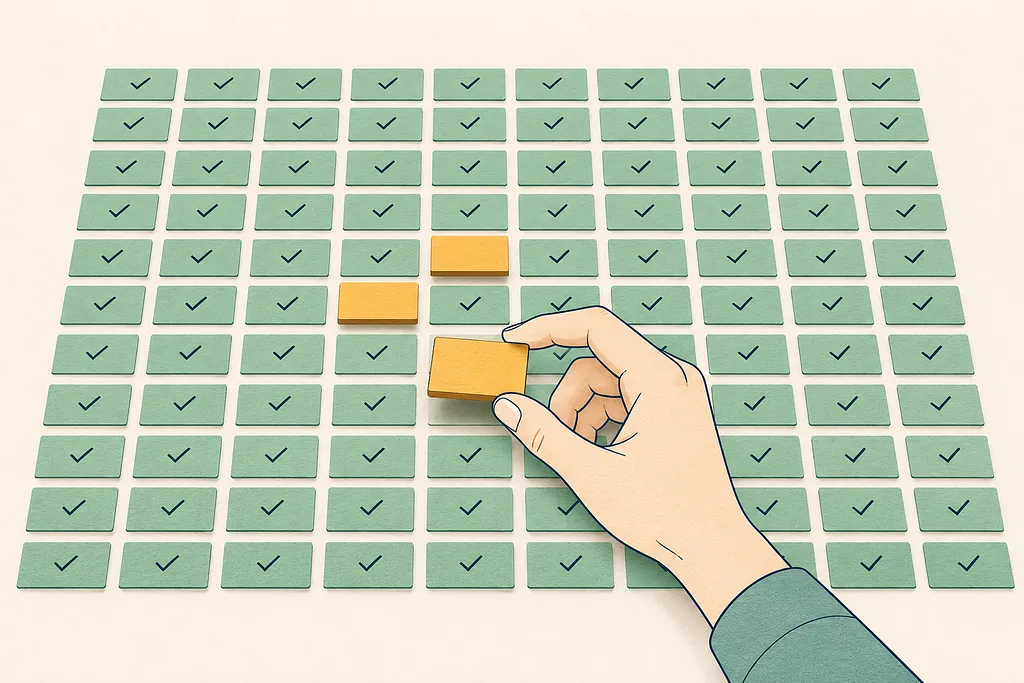
If you ask an AI model to do the same small job ten thousand times, most of the answers will be right. The trouble is that you don’t know which ones.
That was the problem I wanted to solve. Sorting support messages, tagging products, pulling a field out of a document: this is work AI does well and cheaply. But “about 90% correct” isn’t something you can hand to a colleague. Either somebody checks every row, which defeats the purpose, or nobody checks any, and the wrong ones surface later in front of a customer.
I run jobs like this most days, so the question wasn’t abstract for me. I wanted a tool that would say: these rows are fine, and these few need a person. So I built one, called it TwoPass, and tested it in public. This is the story of what worked, what didn’t, and the number I was proud of that turned out to be wrong.
The idea
There is a new kind of AI model that doesn’t write text. You give it a question and a list of possible answers, and it returns its pick with a probability for each option. These are called decision models. They are fast, and they cost a fraction of a cent per question.
My idea was to put one of these in charge of the work, as a checker:
- The checker looks at every row first. If it is confident, its answer is accepted.
- If it isn’t, a cheap writing model answers and the checker judges that answer.
- If the checker still isn’t convinced, a stronger model tries again.
- Whatever is still uncertain goes to a person.
Two passes by writing models, one checker deciding which way each row goes. That’s where the name comes from.
One question decides whether any of this is useful: how confident is confident enough? I didn’t want to guess. The tool takes a thousand examples where the right answer is already known, and finds the confidence level at which the checker’s accepted answers are right 95% of the time. You pick the 95%. The tool works out the rest.
What I built
TwoPass is a command-line tool. You give it a spreadsheet file and a description of the job, and you get the same file back with an answer, a confidence and a status on each row. It runs the writing models in batch mode, which is slower and cheaper, and it can be stopped and resumed without paying for anything twice.
It also has three screens that run on your own computer:
- A run monitor, because batch jobs take anywhere from minutes to hours and I wanted to see where my money was.
- A review queue for the rows sent to a person, built for the keyboard so that a doubtful row takes a few seconds to settle.
- A results explorer, where you move one slider and watch what happens. More on that below.
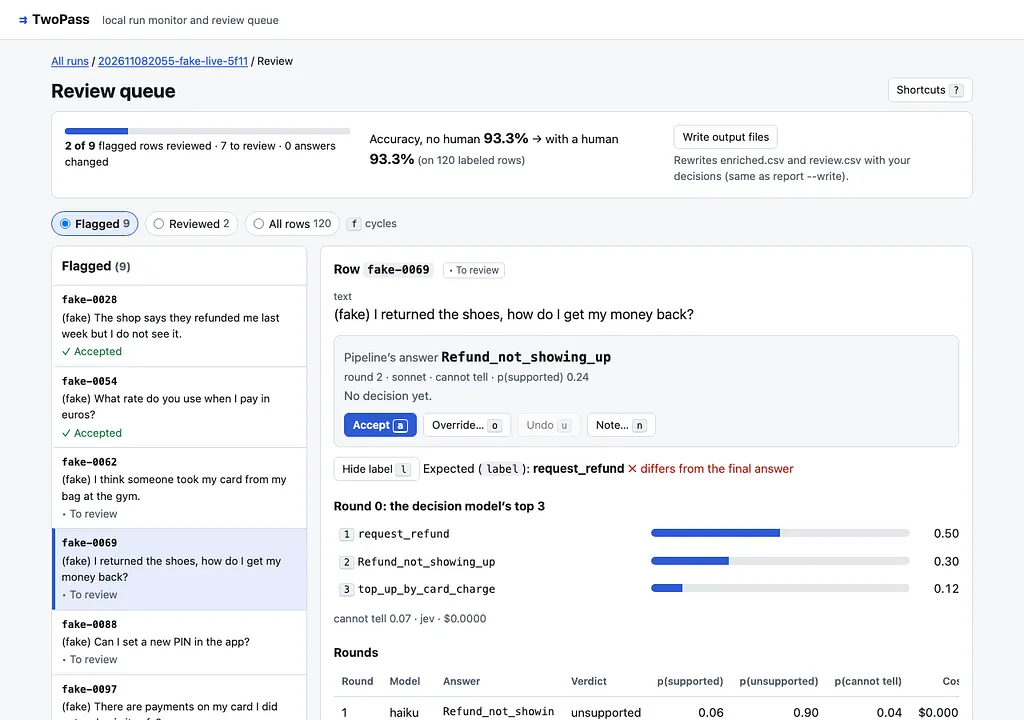
The review queue, shown here on demo data: the message, the tool’s answer, and the checker’s top three guesses.
Most of the building time went into things nobody sees. One model spent its whole answer budget thinking silently and returned nothing. Another wrote a paragraph of explanation when I needed one word. The batch service rejected my row numbers because they contained a character it didn’t like. None of it is interesting, and all of it had to be fixed before a single number could be trusted.
The test
I used a public dataset called Banking77: real customer messages to a bank, each belonging to one of 77 categories such as “card hasn’t arrived” or “transfer failed”. I ran all 3,080 test messages through TwoPass with three different checkers, and I ran a frontier model, Claude Opus 5.5, on its own as the comparison.
With the best checker, a model from Cloudflare called Clef:
- 97.5% of messages were answered automatically, and those answers were right 95.7% of the time. I had asked for 95%.
- 2.5% were sent to a person. That is 78 messages out of 3,080.
- Counting everything, 94.3% of answers were right. Opus on its own got 88.1%.
And the cost: $0.48 per thousand messages for TwoPass against $4.13 for Opus.
8.7 times cheaper, and more accurate. I had my headline.
The headline that didn’t survive
Two days later I was working on something dull: making sure the cost my tool reported for each row added up to what I was actually billed. While doing that, I noticed that every single request was paying full price for the same long piece of text: the names of all 77 categories, plus the instructions. It was about 1,900 tokens, sent 3,080 times.
AI providers have a discount for exactly this, called prompt caching. If the start of your request is the same as a recent one, you pay a tenth of the price or less for that part. I hadn’t turned it on. Not for my tool, and not for the model I was comparing it to.
So I turned it on for both and ran the test again.
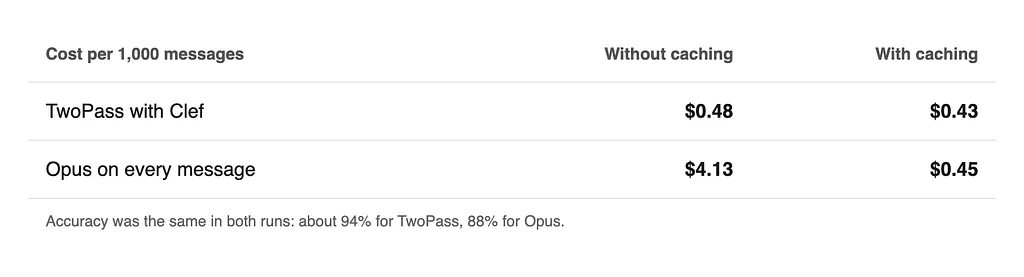
Opus got about 89% cheaper. TwoPass barely moved, because nearly all of its cost is the checker, and checker calls can’t be cached.
My 8.7 times advantage was now about 5%. Call it nothing.
The accuracy barely moved, by 0.2 points at most, and TwoPass stayed about six points ahead of Opus. But the story I was about to tell was a cost story, and it had come from an unfair comparison that I had set up myself. Nobody would have caught it. The numbers were real, the method was written down, and anyone repeating it would have got the same result.
What was left
Once the price argument was gone, I had to ask what the tool was actually good for. The answer was the thing I had built it for in the first place.
It knows which answers to doubt. Of the 78 messages it sent to a person, its own answer was right only 30 times, or 38%. For the messages it accepted, that figure was 95.7%. It isn’t flagging at random. It found the hard ones.
One of them was the message “How do I locate my card?”. Is that about a card in the post, or a card lost at home? The tool’s answer happened to be right, but it wasn’t sure, and I wouldn’t have been either.
You can decide how careful it should be before you start. This is what the explorer’s slider is for. Ask for 99% accuracy on the automatic answers and it shows you how many more rows you will have to check yourself. Ask for 90% and it shows how few. You see the trade before you spend anything.
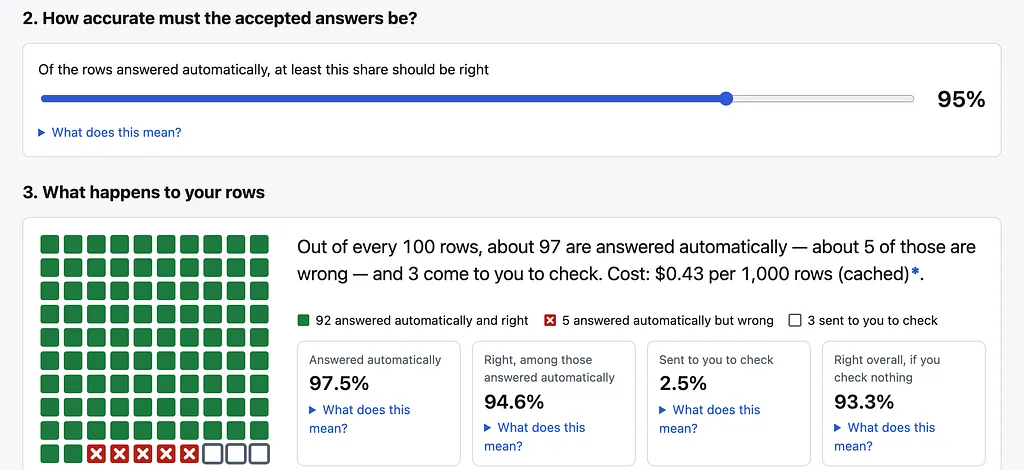
The explorer replaying the thousand example messages used to set the tool up, which is why its figures differ slightly from the test results above. Each square is one message in a hundred.
The promise held on data it hadn’t seen. I asked for 95% on a thousand examples. On 3,080 different messages it delivered 95.7%.
For a lot of real work, that is worth more than a lower bill. A team that knows it has to check 25 rows in every thousand can plan for that. A team that knows “about one in ten is wrong, somewhere” can’t.
What I learned
1. Give the other side every advantage before you compare. My comparison wasn’t dishonest, it was lazy. I had tuned my own tool carefully and left the baseline on default settings. I’ve since read other benchmarks of these checker models, and none of the ones I found mention caching. If you see “5 times cheaper” anywhere, ask what the expensive option was allowed to use.
2. Check your cost numbers against the bill. The reported token counts turned out to include cached tokens in a way that made the obvious calculation wrong in both directions: about half the true cost in one case, more than six times too high in another. I only found the caching problem because I was reconciling to the cent.
3. The simple version was nearly as good. This one stings a little. When I looked at what each step contributed, the checker’s first pick alone was right 94.5% of the time. The whole pipeline scored 94.3%. Of the 19 answers that were accepted after a rewrite, only 4 were right. On this task, the two passes that give the tool its name added nothing. What did the work was the checker and a carefully chosen confidence level.
I’m not the only one to see this. An independent test of another checker model reached the same conclusion: a second model only helps if it is clearly stronger than the first.
4. Which checker you use matters more than anything else. With the two other checkers I tried, the tool sent 43% and 95% of messages to a person. Same pipeline, same data, same target. One of them could never reach 95% on its own picks at any confidence level.
This isn’t special to my tool. In a recent conference talk, a team showed the same AI agent scoring 74% under one automatic judge and 38% under a verifier they had checked against human labels. A checker is only worth trusting once you have measured it against answers you know.
5. A person in the loop is a feature. I started out treating the rows sent to a human as a failure to minimise. I now think that an honest “I don’t know” on 2.5% of rows is the most valuable thing the tool produces.
What this doesn’t prove
- It is one dataset. Bank messages in English, 77 categories. I don’t know how the numbers move on your data, and neither do you until you try.
- The checker may have seen this kind of data before. Banking77 is public and well known, and Cloudflare reports Clef’s score on it in their own launch material without saying whether it was kept out of training. I reworded 300 messages to test for memorised answers and Clef’s accuracy dropped by 3.7 points, about the same as the other checkers, so I found no sign of it. That test can’t rule out that Clef simply learned this type of task very well.
- You need examples with known answers. A thousand in my test. Without them there is nothing to set the confidence level against, and I wouldn’t trust any default.
- The idea isn’t new. Trying a cheap model first and checking its work is well studied, and there is a published recipe for doing it with a checker model. What I’ve added is a measurement at this size, with the confidence level fitted on separate data and the baseline given its discount.
- The comparison isn’t perfectly even. To save money, Opus ran on 1,000 of the 3,080 messages. On those same 1,000, TwoPass scored 94.5% against 88.1%. It was right where Opus was wrong on 74 messages, and the reverse on 10.
- Is that gap just noise? I had run each setup twice, two days apart, so I checked. Opus gave a different answer the second time on 1.9% of messages, and TwoPass on 0.8%. The two disagreed with each other on 9.1%. The gap is several times larger than either one’s own wobble, though two runs each is a small basis.
- Batch mode can be slow. One round of 97 messages waited two and a half hours in a queue.
Would I use it?
If you have a lot of repetitive AI work, some examples with known answers, and someone who can check a small share of the output: yes, and that last part is the point. You find out how much checking your accuracy target costs, and you get the rows to check in a queue.
If you need answers in seconds, or you have no examples to set it up with, a strong model with caching turned on will serve you better, and now costs about the same.
The code, the benchmark and every number in this article are on GitHub: github.com/Rubick1997/twopass. You can run a small version of the test yourself for about 20 cents. Be patient, though: when I ran it from a fresh copy, it took eight and a half hours, seven of them waiting for the first batch of 60 messages in the provider’s queue.
I’m glad I ran the numbers twice. The first result would have got more clicks, and the second is one I can stand behind.
Sources
- Dwayo AI, Which of your LLM calls are really decisions? What we measured with a System One model (DEV, October 2026). The independent test in lesson 3.
- Miguel González Fernández (Browserbase) and Corby Rosset (Microsoft Research), Your LLM Judge Is a Confident Liar: Building Better Verifiers (AI Engineer talk). The 74% and 38% figures in lesson 4.
- Shuhui Qu, Routing LLM calls: predict the model, or verify the answer? (October 2026). A review of routers and cascades.
- OpenRouter cookbook, Jev verified cascade. The published recipe for a cascade with a checker model.
- Casanueva et al., Efficient Intent Detection with Dual Sentence Encoders (2020). The paper that introduced Banking77. The dataset is on Hugging Face.
- Cloudflare, Introducing Clef: Cloudflare’s first open-source decision models, now on Workers AI (1 October 2026). The launch note that reports Clef’s Banking77 score.
- Anthropic, Prompt caching (Claude Platform Docs). How the caching discount is priced.
- TwoPass, code and benchmark: github.com/Rubick1997/twopass.